



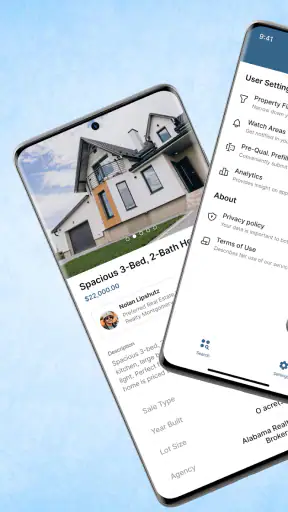
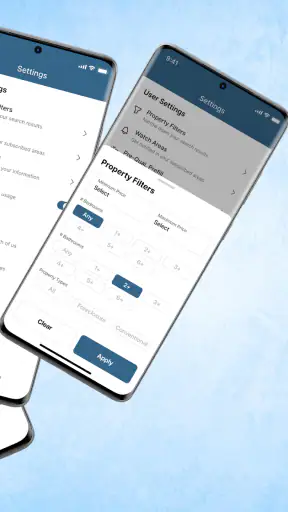
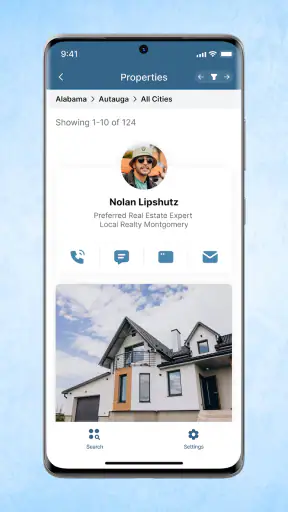
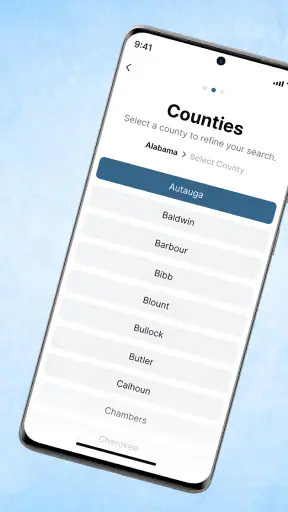
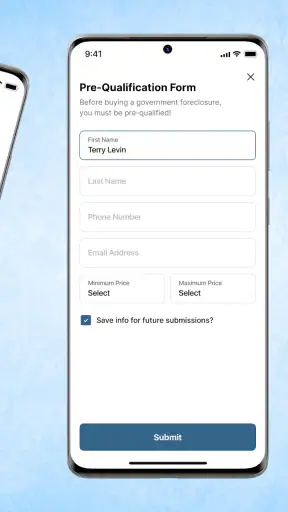
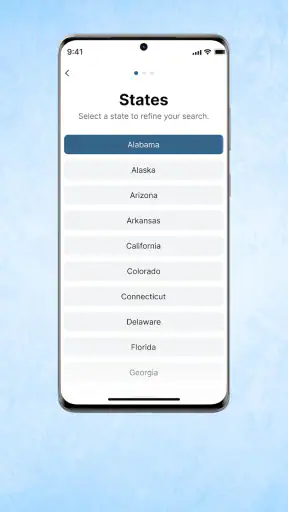

Searching for a home is already stressful, and looking specifically for foreclosure properties adds another layer of uncertainty. Foreclosure Home Search, the app from Heavy Hammer, takes a focused approach: it is designed to help people find homes for sale in their area, with its identity centered on foreclosure listings rather than general household organization. I found that narrow purpose useful when I wanted to explore distressed-property opportunities without treating a broad real-estate app as my only starting point.
The app is free, aimed at Everyone, and belongs to the House & Home category. Its store summary presents USHUD.com as a way to find homes for sale nearby, while the shorter description makes the foreclosure focus much clearer. That distinction matters. This is not the kind of app I would open when I simply want decorating ideas, mortgage education, or a complete moving checklist. I would use it at the beginning of a property search, when I am trying to discover possibilities and decide which homes deserve more serious research.
My overall impression is cautious but positive. A foreclosure-search tool can save time by putting a particular kind of listing in front of me, yet it should never be mistaken for a complete buying system or a substitute for checking official records and speaking with qualified professionals. The app works best as a discovery layer. Its real value depends on how carefully I verify what I find after the initial search.
What the app is really useful for
The strongest reason to install this app is focus. Standard property apps often mix ordinary sales, rentals, new construction, and other categories together. That is convenient for a general search, but it can make a foreclosure-focused hunt feel scattered. Here, the central idea is more specific: start with properties that may be connected to foreclosure activity and then investigate them further.
That focus is particularly helpful for someone who is still learning the market. A first-time buyer may want to understand what kinds of homes appear in a target area, how far a preferred neighborhood is from other options, and whether a particular price range produces realistic possibilities. I would not treat the results as a final shortlist immediately. Instead, I would use them to build a map of the local opportunity and identify questions for the next stage.
There is also a practical benefit for investors and experienced buyers who already know the risks. They may not need a gentle introduction to property searches; they may need a faster way to scan for leads. The app’s specialized purpose can make that first pass less distracting than browsing a general-purpose service. Still, the advantage is only meaningful if the user is willing to inspect each listing carefully rather than assuming that every result is ready for a normal purchase.
A realistic everyday scenario would be a buyer who has a limited weekend to explore several neighborhoods. On a weekday evening, I would search the areas I can realistically reach, note the properties that appear repeatedly or seem close to my budget, and group them by location. Before arranging a viewing, I would compare each address with local property information, check whether the home is occupied, and ask an agent or attorney what kind of sale is involved. That workflow turns the app into a useful first filter instead of an unsafe shortcut.
Why foreclosure searches need more patience
Foreclosure properties are not simply ordinary homes with a lower price tag. Their condition, ownership status, occupancy, title history, and sale process can all require additional investigation. A listing that looks attractive on a phone screen may involve repairs, liens, legal complications, or timing constraints that are invisible during an initial search.
That is why I see the app as a lead generator rather than a decision maker. It can help me answer, “What should I investigate next?” It cannot answer every question that comes before an offer. If I wanted a polished buying experience with extensive property details, integrated communication, and a broad set of transaction tools in one place, I would likely pair this app with a more comprehensive real-estate service and a local professional.
The trade-off is straightforward: specialization can reduce search clutter, but it may also leave me needing other tools. That is not necessarily a flaw. In fact, it is healthier than expecting one small app to replace title research, inspections, financing advice, and legal guidance. The important thing is to understand the boundary before relying on the results.
Trust, controls, and careful use of property information
When I review a property-search app, I pay attention not only to the listings but also to the choices the app gives me as a user. Search tools can influence major financial decisions, so I want to know what I am looking at, what I am being asked to do, and whether I can continue browsing without rushing into a commitment. With Foreclosure Home Search, I would keep that same disciplined approach throughout the process.
The app is free, which removes a direct purchase barrier for someone who wants to test it before deciding whether it belongs in a longer search routine. That makes the first step easy: install it, explore a few locations, and see whether the results are relevant to the kind of property research I actually need. Free access does not make a listing accurate by itself, however, so I would separate the cost question from the trust question.
The app has a broad age classification of Everyone, but the subject matter is still more suitable for adults making housing decisions. A foreclosure search can expose users to financial and legal consequences, even when the interface itself is simple. I would not let the age label create a false sense that the process is uncomplicated. Younger users or anyone unfamiliar with property transactions should involve a trusted adult or qualified adviser before taking action.
Account and privacy choices deserve attention at the moment they appear. I would read each screen before entering contact information, creating an account, or agreeing to notifications. If the app offers a way to browse without sharing more personal details, I would use that route during the initial research phase. If a form asks for information before showing useful results, I would consider whether the benefit is worth the extra exposure and whether I can obtain the same information elsewhere.
I also avoid treating a request for contact details as proof that a property is especially suitable. In housing searches, personal information can quickly lead to calls, emails, or follow-up messages. My preferred workflow is to search broadly first, record the addresses that matter, and only then decide whether to share details with a professional or service. That keeps the user in control and reduces impulsive decisions made from a single promising result.
How I would handle sensitive search moments
The most sensitive moment is not installation; it is when a listing appears to offer an unusually attractive opportunity. That is when I slow down. I would capture the address and visible details, then verify the property through independent sources before contacting anyone. I would also check whether the listing appears current, because property status can change and a search result may not reflect the latest stage of a sale.
Another important moment is moving from browsing to action. If the app presents a contact option, I would decide exactly what I want to ask before submitting anything. Useful questions might concern the sale type, viewing arrangements, occupancy, required timelines, and whether additional documents are available. Preparing those questions first helps me avoid sending personal information without a clear purpose.
I would be especially careful with payment requests. A free search app should not make me assume that every person or service connected with a listing is trustworthy. I would never send money, identification documents, or banking information merely because a property appears in a search. Any financial step should be handled through verified professionals and established processes, not through pressure from an unknown contact.
The app’s current version is 2.5.25, and it runs on Android starting with version 7.0. Those details make it accessible to many older devices, which is useful if I am using a spare phone for research. At the same time, I would keep the operating system and app updated where possible, because account security and privacy controls are easier to manage when the device is maintained. Compatibility is convenient, but it should not replace ordinary digital caution.
Practical controls for a more reliable workflow
I would begin with a small geographic area rather than searching an entire region at once. A narrow search makes it easier to compare addresses, notice duplicates, and recognize when a result does not fit the neighborhood I intended. Once I understand the quality of the results, I would expand gradually. This is more useful than collecting a long list that I cannot verify.
My second habit would be to keep a simple research note for every serious candidate. I would record the address, the date I viewed it, the visible status, questions that remain unanswered, and the independent source I used for verification. This prevents a common mistake: confusing two similar listings or forgetting which details came from the app and which came from a trusted official source.
A third useful habit is to classify each result by next action rather than by excitement. One group might contain homes worth checking with public records; another might contain properties that need a professional opinion; a final group might be unsuitable because the location, condition, or process does not fit my situation. This keeps the search analytical and makes it easier to stop pursuing a tempting but impractical lead.
I would also avoid granting more access than the task requires. If a permission or account request appears, I would consider whether it is necessary for the search I am trying to perform. I would review notification settings as well, because frequent alerts can make a property hunt feel urgent even when I still need to verify basic facts. The best experience is one where I decide when to research, when to respond, and when to walk away.
Who should use it, and who should choose something else
This app is a good fit for a buyer, researcher, or investor who specifically wants to explore foreclosure-related opportunities and is comfortable doing follow-up work. It can also suit someone who is beginning a local search and wants a focused source of leads before speaking with an agent. The free price makes experimentation easy, especially if I am comparing several ways to discover properties.
I would be less likely to recommend it as the only tool for a first-time buyer who expects a guided purchase journey. Someone who needs detailed financing support, inspection coordination, transaction management, or extensive neighborhood information will probably be better served by combining this app with a full-service real-estate platform and professional advice. A conventional property app may also be the better choice if the user is not specifically interested in foreclosures.
It is also not the right match for someone who dislikes uncertainty. Foreclosure research can involve more verification and patience than a standard home search. If I want to compare ordinary listings quickly, schedule tours, and communicate through a familiar end-to-end system, another category of app may feel smoother. The specialized focus is an advantage only when it matches the user’s actual goal.
What the adoption and rating suggest
Heavy Hammer’s app has passed one million installs, and its average rating is 3.8 from around 4.8 thousand ratings, with roughly 1.4 thousand written reviews. I read that combination as evidence of meaningful interest, but not as a reason to stop evaluating the experience for myself. A moderate rating often fits a tool that is useful to a particular audience while leaving some users dissatisfied with coverage, freshness, or ease of use.
Those figures also reinforce my advice to test the app in the exact area where I plan to search. A property tool can feel excellent in one market and much less useful in another, depending on the available listings and how often information changes. I would spend a short session checking several nearby locations before building my entire search around it.
My final view after using it as a research aid
Foreclosure Home Search is most convincing when I treat it as an early-stage investigation tool. Its free access, narrow housing focus, and local-search purpose make it an easy way to look for leads that might not be prominent in a general property browse. I appreciate that it can give a search a clear direction instead of forcing me to sift through every kind of home listing.
My reservation is equally clear: the app should not carry the weight of a purchase decision. I would verify every promising address, protect my personal information, question any urgent request, and involve qualified professionals before making financial or legal commitments. The app can help me find where to look, but it cannot remove the risks that come with distressed property.
My recommendation is to use it as one carefully controlled part of a broader search. Install it if foreclosure opportunities are genuinely relevant to your plans, start with a small area, keep independent notes, and judge the results by what you can verify rather than by how attractive a listing looks. If you want a complete, guided home-buying service, choose a broader alternative alongside it. For focused discovery with sensible caution, this app is worth trying.


